Shared KYC
Preamble
This guide covers the technical aspects of sharing SumSub KYC data with Guardarian, including how Guardarian accepts sharing tokens and how the flow affects the customer experience.
SumSub shareToken implementation
SumSub’s shareToken lets customers reuse KYC data between integrated platforms instead of completing the same verification again. The flow is:
- A customer passes KYC in service X and registers at partner service Y.
- X generates a share token and passes it to Y.
- Y calls the SumSub API with the share token and receives the customer data and documents.
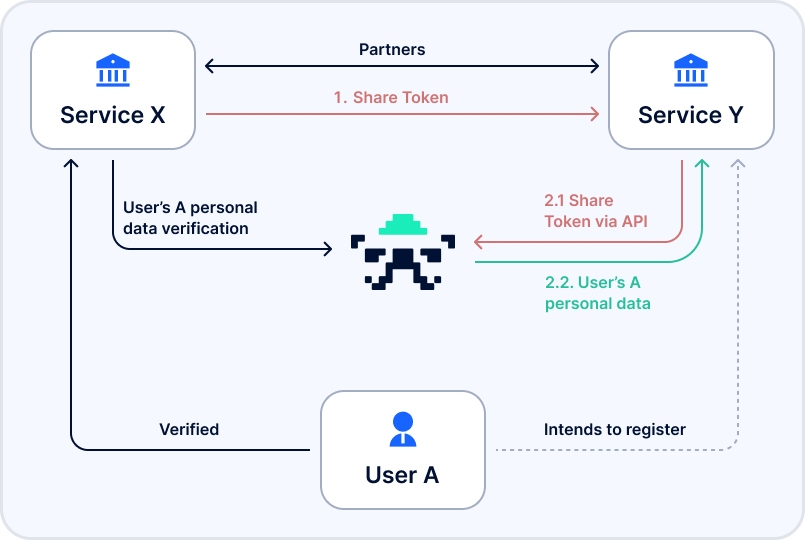
Generating a shareToken
SumSub’s internal API offers an endpoint that generates a shareToken. Pass the customer's SumSub applicantId and the partner service clientId as query parameters:
## applicantId and Y's client ID must be provided
curl -X POST 'https://api.sumsub.com/resources/accessTokens/-/shareToken?applicantId=5ce412012b4da877b2d910bd&forClientId=CoolCoinLtd'
Response:
{
  "token": "_act-460a698b-d2bc-4cbc-9456-5f36fee38083",
  "forClientId": "CoolCoinLtd"
}
You can read more information about this flow in the SumSub API Reference.
Integrating with Guardarian
Currently, Guardarian accepts passing the shareToken as a parameter when creating the transaction. Several fields are required to be set in the request for this flow to trigger:
| field name | type | acceptable values |
|---|---|---|
kyc_shared_token | string | any shareToken generated by SumSub |
kyc_shared_token_provider | string enum | sumsub |
Example:
{
  "from_amount": 1200.24,
  "from_currency": "EUR",
  "to_currency": "BTC",
  "from_network": "EUR",
  "to_network": "BTC",
  "kyc_shared_token": "_act-460a698b-d2bc-4cbc-9456-5f36fee38083",
  "kyc_shared_token_provider": "sumsub"
}
Please note the required kyc_shared_token_provider field. For SumSub KYC integrations, use the sumsub value.
Final flow
The transaction flow for customers who have passed KYC on partner side follows these steps:
- Get the customer’s
applicantIdand prepare the partner serviceclientId - Use the prepared
applicantIdandclientIdto obtain ashareTokenfrom SumSub via its API - While creating a transaction on the Guardarian platform, pass the obtained
shareTokenin the fieldkyc_shared_tokenand set thekyc_shared_token_providerfield value tosumsub.
Customers passed to Guardarian through this flow do not need to repeat the required KYC steps.
- Guardarian skips KYC for customers with verified profiles (green review result). Customers with SumSub profiles that are not verified must still complete KYC.
- The
shareTokenhelps customers skip the Guardarian KYC process, but Guardarian risk checks can trigger additional SumSub verification. For more information, see the AML/CTF policy. - SumSub outlines the necessity of a tripartite agreement on personal data sharing between SumSub and the integrating services before using
shareTokenfunctionality.